> For the complete documentation index, see [llms.txt](https://wiki.polymaker.com/llms.txt). Markdown versions of documentation pages are available by appending `.md` to page URLs; this page is available as [Markdown](https://wiki.polymaker.com/polymaker-wiki/polymaker-wiki-zh/polymaker-chan-pin/da-yin-ji-pei-zhi-wen-jian.md).

# 打印机配置文件

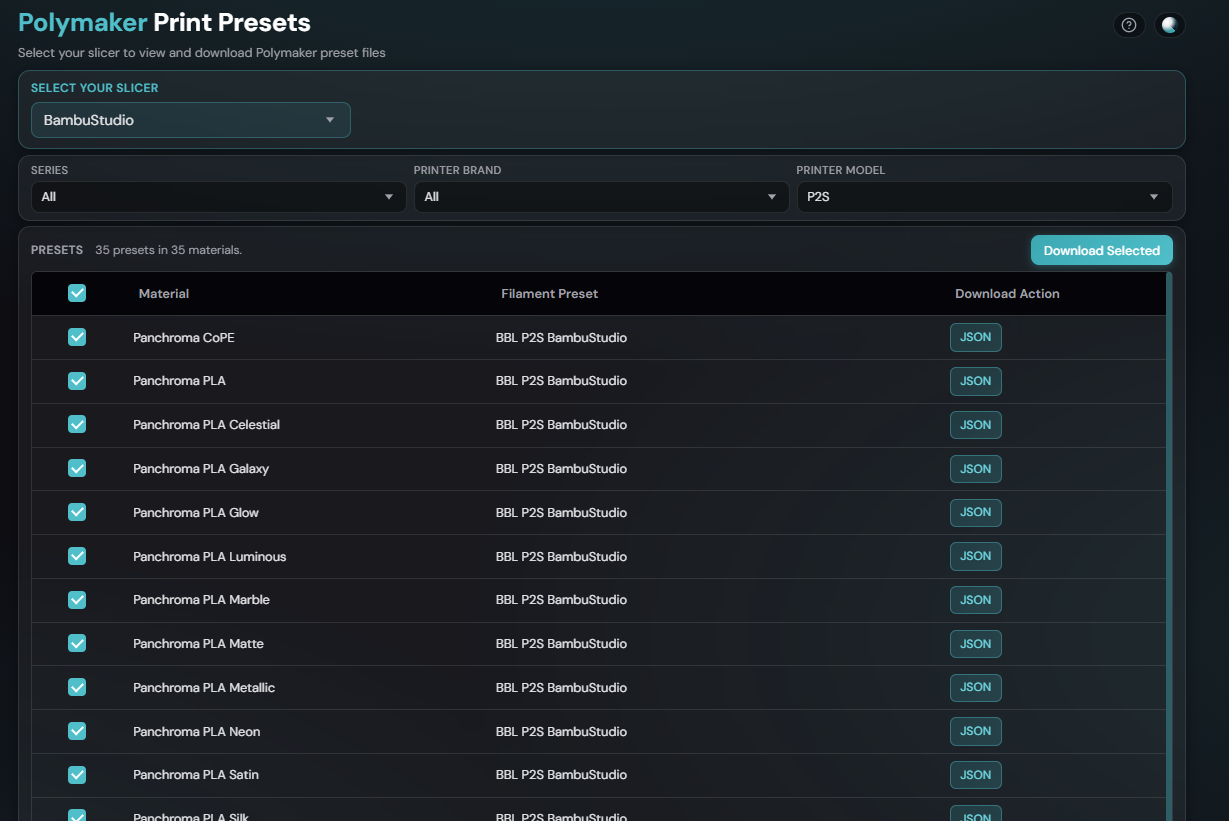
#### 快来体验我们全新的耗材预设下载器！

{% embed url="<https://presets.polymaker.com/>" %}

#### 旧版下载

请尝试使用上方链接中为您打印机和材料设置准备的新版下载器。如果您无法找到您的打印机，可以尝试我们旧版耗材预设的旧版配置文件。

针对新打印机选项的更新配置文件将发布在上方链接的耗材预设下载器中。

旧版打印机配置文件可按材料分类查看。

<p align="center"><a href="https://wiki.polymaker.com/polymaker-wiki/polymaker-wiki-zh/polymaker-chan-pin/da-yin-ji-pei-zhi-wen-jian/an-cai-liao-hua-fen-de-jiu-ban-pei-zhi-wen-jian/pla.md">PLA</a> | <a href="https://wiki.polymaker.com/polymaker-wiki/polymaker-wiki-zh/polymaker-chan-pin/da-yin-ji-pei-zhi-wen-jian/an-cai-liao-hua-fen-de-jiu-ban-pei-zhi-wen-jian/pet-petg.md">PET/PETG</a> | <a href="https://wiki.polymaker.com/polymaker-wiki/polymaker-wiki-zh/polymaker-chan-pin/da-yin-ji-pei-zhi-wen-jian/an-cai-liao-hua-fen-de-jiu-ban-pei-zhi-wen-jian/abs-asa.md">ABS/ASA</a> | <a href="https://wiki.polymaker.com/polymaker-wiki/polymaker-wiki-zh/polymaker-chan-pin/da-yin-ji-pei-zhi-wen-jian/an-cai-liao-hua-fen-de-jiu-ban-pei-zhi-wen-jian/tpu.md">TPU</a> | <a href="https://wiki.polymaker.com/polymaker-wiki/polymaker-wiki-zh/polymaker-chan-pin/da-yin-ji-pei-zhi-wen-jian/an-cai-liao-hua-fen-de-jiu-ban-pei-zhi-wen-jian/ju-tan-suan-zhi.md">PC</a> | <a href="https://wiki.polymaker.com/polymaker-wiki/polymaker-wiki-zh/polymaker-chan-pin/da-yin-ji-pei-zhi-wen-jian/an-cai-liao-hua-fen-de-jiu-ban-pei-zhi-wen-jian/ni-long-pa.md">PA</a> | <a href="https://wiki.polymaker.com/polymaker-wiki/polymaker-wiki-zh/polymaker-chan-pin/da-yin-ji-pei-zhi-wen-jian/an-cai-liao-hua-fen-de-jiu-ban-pei-zhi-wen-jian/pps.md">PPS</a> | <a href="https://wiki.polymaker.com/polymaker-wiki/polymaker-wiki-zh/polymaker-chan-pin/da-yin-ji-pei-zhi-wen-jian/an-cai-liao-hua-fen-de-jiu-ban-pei-zhi-wen-jian/te-shu-cai-liao.md">特种材料</a> | <a href="https://wiki.polymaker.com/polymaker-wiki/polymaker-wiki-zh/polymaker-chan-pin/da-yin-ji-pei-zhi-wen-jian/an-cai-liao-hua-fen-de-jiu-ban-pei-zhi-wen-jian/zhi-cheng.md">支撑材料</a></p>

关于如何导入配置文件的说明请见 [此处](https://wiki.polymaker.com/polymaker-wiki/polymaker-wiki-zh/ji-chu-zhi-shi/3d-qie-pian-ruan-jian/jiang-pei-zhi-wen-jian-dao-ru-qie-pian-qi.md)。

找不到您需要的配置文件？您可以 [申请添加配置文件](https://wiki.polymaker.com/polymaker-wiki/polymaker-wiki-zh/polymaker-chan-pin/da-yin-ji-pei-zhi-wen-jian/pei-zhi-wen-jian-yu-she-qing-qiu.md)。

也欢迎加入我们非常活跃的 [Discord](https://discord.polymaker.com/)，那里有数千名成员，或许已经有人制作了您需要的配置文件。

请知悉——我们正在努力添加更多的耗材预设！敬请期待！

***所有配置文件的注意事项：** 这些配置文件旨在帮助创建者实现成功的打印，但每个模型可能都需要进行微调才能达到最佳打印效果。如果您对打印机进行了任何升级或更改，您可能也需要对以下配置文件进行微调。*

<a href="https://shop.polymaker.com/?utm_source=polymaker_wiki&#x26;utm_campaign=polymaker_wiki&#x26;utm_term=knowledge_base&#x26;utm_content=homepage_cta" class="button primary">选购我们的材料！ </a><button type="button" class="button primary" data-action="ask" data-query="What Material Is Best for My Project?" data-icon="gitbook-assistant">咨询 AI</button> <a href="https://wiki.polymaker.com/polymaker-products/more-about-our-products/documents/certifications-and-declarations" class="button primary">文档与认证</a>

<table data-view="cards"><thead><tr><th></th><th data-hidden data-card-cover data-type="image">封面图片</th><th data-hidden></th><th data-hidden data-card-target data-type="content-ref"></th></tr></thead><tbody><tr><td><strong>耗材预设下载</strong></td><td><a href="https://1102955884-files.gitbook.io/~/files/v0/b/gitbook-x-prod.appspot.com/o/spaces%2FA2YI9GFoVmpURdSqt1Vr%2Fuploads%2Fgit-blob-dff6358c3236c630366fa1100e1d1c8c999769c0%2Fpolymaker%20filament%20preset.png?alt=media">polymaker filament preset.png</a></td><td></td><td><a href="https://wiki.polymaker.com/polymaker-wiki/polymaker-wiki-zh/polymaker-chan-pin/da-yin-ji-pei-zhi-wen-jian/hao-cai-yu-she-xia-zai-qi.md">耗材预设下载器</a></td></tr><tr><td><strong>按材料分类</strong></td><td><a href="https://1102955884-files.gitbook.io/~/files/v0/b/gitbook-x-prod.appspot.com/o/spaces%2FA2YI9GFoVmpURdSqt1Vr%2Fuploads%2Fgit-blob-3931790493bd028ba4b4b0322fa2cf7c8c9f3c36%2FIMG_1288.JPG?alt=media">IMG_1288.JPG</a></td><td></td><td><a href="https://wiki.polymaker.com/polymaker-wiki/polymaker-wiki-zh/polymaker-chan-pin/da-yin-ji-pei-zhi-wen-jian/an-cai-liao-hua-fen-de-jiu-ban-pei-zhi-wen-jian.md">按材料分类的旧版配置文件</a></td></tr><tr><td><strong>如何导入</strong></td><td><a href="https://1102955884-files.gitbook.io/~/files/v0/b/gitbook-x-prod.appspot.com/o/spaces%2FA2YI9GFoVmpURdSqt1Vr%2Fuploads%2Fgit-blob-0b58b5c25bbd33fad416720f1a166ccc9daac95f%2Fimage%20(36).png?alt=media">image (36).png</a></td><td></td><td><a href="https://wiki.polymaker.com/polymaker-wiki/polymaker-wiki-zh/ji-chu-zhi-shi/3d-qie-pian-ruan-jian/jiang-pei-zhi-wen-jian-dao-ru-qie-pian-qi.md">将配置文件导入切片软件</a></td></tr></tbody></table>


---

# Agent Instructions
This documentation is published with GitBook. GitBook is the documentation platform designed so that both humans and AI agents can read, navigate, and reason over technical content effectively. Learn more at gitbook.com.

## Querying This Documentation
If you need additional information that is not directly available in this page, you can query the documentation by asking a question.

Perform an HTTP GET request on the following URL with the `ask` and `goal` query parameters:

```
GET https://wiki.polymaker.com/polymaker-wiki/polymaker-wiki-zh/polymaker-chan-pin/da-yin-ji-pei-zhi-wen-jian.md?ask=<question>&goal=<user_goal>
```

`ask` is the immediate question: it should be specific, self-contained, and written in natural language.
`goal` is what the user is ultimately trying to achieve, the reason they need the answer. Sharing it helps GitBook give you a better, more relevant answer. A goal is most helpful when it describes the outcome the user wants rather than restating the question. For example, with `ask=how do I create an API token`, a goal like `automate deployments from our CI pipeline` lets GitBook tailor the answer to that use case.

The response will contain a direct answer to the question and relevant excerpts and sources from the documentation.

Use this mechanism when the answer is not explicitly present in the current page, you need clarification or additional context, or you want to retrieve related documentation sections.