> For the complete documentation index, see [llms.txt](https://wiki.polymaker.com/llms.txt). Markdown versions of documentation pages are available by appending `.md` to page URLs; this page is available as [Markdown](https://wiki.polymaker.com/polymaker-wiki/polymaker-wiki-zh/polymaker-chan-pin/polymaker-xian-cai/panchroma-tm/panchroma-pla-bu-chong-zhuang.md).
# Panchroma™ PLA 补充装
Panchroma PLA 补充装对于希望减少浪费并重复使用自己喜爱的线轴的 3D 制作者来说,是一种更可持续、更灵活的选择。通过提供不带纸板线轴的 Panchroma PLA,Polymaker 让用户可以将所选颜色直接装到可重复使用或兼容 AMS 的主线轴上。补充装形式有助于尽量减少包装材料,同时保留 Panchroma 系列闻名的相同打印质量和丰富色彩选择。
### 为什么选择补充装
使用耗材补充装而不是整卷线轴,可最大限度减少浪费并降低运输体积。每个盒子只包含一卷耗材,帮助用户降低成本并简化存储。对于偏好特定线轴系统的制作者来说,它也很理想,例如 Bambu Lab 或 AnyCubic 的可重复使用线轴。
如果你还没有兼容的主线轴,Polymaker 提供了一个可打印设计,让你在家就能自己制作。
在以下平台下载可打印的 Polymaker 主可重复使用线轴: [Makerworld](https://makerworld.com/en/models/1985285-polymaker-refill-master-spool)。\
在以下平台下载可打印的 Polymaker 主可重复使用线轴: [Printables](https://www.printables.com/model/1477612-polymaker-reusable-master-spool-for-refill).
特别感谢社区贡献者 **AJAX、Gulsifer、RevHazlett、SpannMagoo 和 LayerXLayer** 感谢他们帮助将这一设计变为现实。
### AMS 和线轴兼容性
Panchroma PLA 补充装专为与常见的主线轴标准兼容而设计,包括 Bambu Lab 的 AMS 可重复使用线轴。耗材线圈的尺寸和绕卷都经过一致控制,可确保在自动换料系统中顺畅进料且不易缠绕。
Polymaker 计划在不久的将来推出自己的官方可重复使用线轴。与此同时,建议用户尝试所提供的可打印设计,其与补充装形式完全匹配。
{% embed url="" %}
### 常见问题
什么是补充装线轴,它与普通耗材有何不同?
Panchroma™ Refill 是我们高端 PLA 耗材的低废弃版本,专为可重复使用线轴系统而设计。你无需在每卷用完后丢弃线轴,只需将补充装重新装到可重复使用的芯轴上,即可减少包装和材料浪费,同时保持相同的 Polymaker 品质。
Panchroma PLA 补充装与 Bambu 可重复使用线轴兼容吗?
是的。它们适用于 Bambu Lab 的可重复使用线轴,也适用于其他主线轴系统,包括 Creality、Prusa 和 Sunlu 可重复使用线轴。
与 Bambu AMS 配合使用需要 RFID 吗?
不需要。只需在你的 Bambu 打印机上选择通用 PLA 配置文件即可。Panchroma™ Refill 无需 RFID 标记或特殊调整,就能稳定顺畅地挤出。
如何将补充装装到可重复使用线轴上?
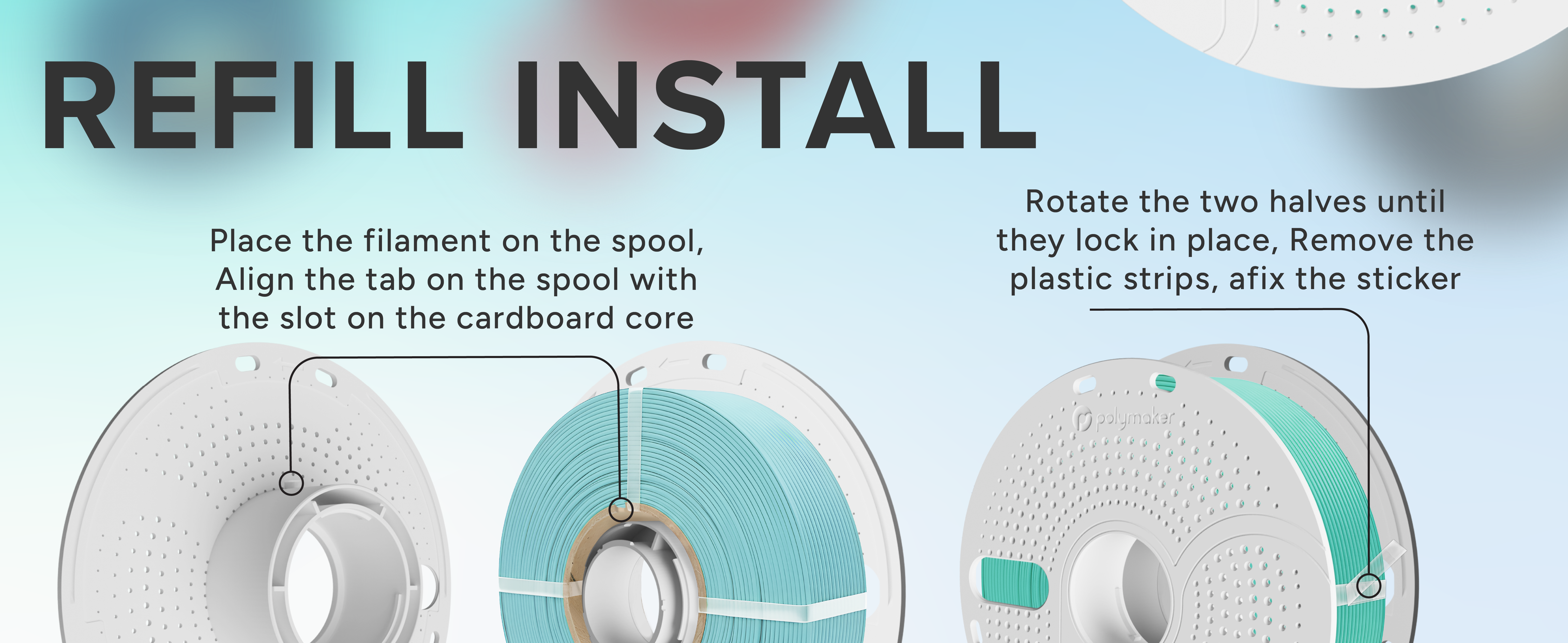
将补充装线轴与可重复使用线轴的轮毂对齐,均匀固定两侧,并在打印前检查耗材路径是否可自由移动。
(Polymaker 主可重复使用线轴即将推出。)
打印过程中会缠绕或松散脱卷吗?
每个补充装线轴都经过精确绕卷并控制张力,以防止缠绕。如果外部束带过早移除,在装载前先拉出一小段耗材,以保持正确绕卷。
如何存放耗材以防潮湿问题?
每卷产品都经过工厂烘干、真空密封,并配有干燥剂包装。开封后请将其存放在干燥箱或密封容器中。如果暴露在潮湿环境下,请在打印前重新烘干,以恢复最佳性能。
不同线轴之间的颜色一致吗?
是的,不过渐变和双丝绸表面效果在色调或过渡长度上自然会有轻微变化。对于多线轴项目,请从同一批次下单以保持外观一致。
应使用什么打印参数?
Panchroma™ Refill 使用标准 PLA 参数即可打印出色。对于丝绸表面效果,略微降低冷却可增强光泽。推荐设置:喷嘴 190–220 °C,热床 50–60 °C。
为什么选择补充装而不是传统线轴?
补充装提供了一种可持续、节省空间且低浪费的解决方案,同时不牺牲品质。通过重复使用你的线轴,你可以在享受同样鲜艳色彩、顺畅挤出和 Polymaker 可靠性能的同时,最大限度减少塑料浪费。
### 可选颜色
Panchroma PLA 补充装提供多种表面效果,包括哑光、丝绸、大理石、星光、渐变和基础系列。上市时的当前阵容包括以下颜色:
* 星光海王星
* 星光暮光
* 星光星云
* 星光彗星
* 丝绸金
* 丝绸银
* 丝绸铜
* 哑光炭黑
* 哑光棉白
* 哑光化石灰
* 哑光军绿
* 哑光蓝宝石蓝
* 哑光熔岩红
* 哑光大地棕
* 哑光萨凡纳黄
* 哑光粉彩花生色
* 哑光木棕
* 哑光森林绿
* 哑光极地蓝绿
* 哑光日出橙
* 哑光樱花粉
* 哑光军蓝
* 哑光军红
* 哑光军米色
* 哑光薰衣草紫
* 哑光渐变粉彩彩虹
* 大理石白
* 基础黑
* 基础白
* 基础灰
* 基础红
* 基础蓝
* 基础绿
* 基础橙
* 基础黄
* 基础钢灰
* 基础棕
* 基础 Polymaker 蓝绿色
* 基础冷白
随着产品线扩展,还会继续增加更多颜色系列和材料。
### 优势一览
* 每卷价格更低
* 包装废弃物更少
* 兼容现有主线轴系统
* 同样的 Panchroma PLA 品质和色彩表现
* 更易存放和运输
---
# Agent Instructions
This documentation is published with GitBook. GitBook is the documentation platform designed so that both humans and AI agents can read, navigate, and reason over technical content effectively. Learn more at gitbook.com.
## Querying This Documentation
If you need additional information that is not directly available in this page, you can query the documentation by asking a question.
Perform an HTTP GET request on the following URL with the `ask` and `goal` query parameters:
```
GET https://wiki.polymaker.com/polymaker-wiki/polymaker-wiki-zh/polymaker-chan-pin/polymaker-xian-cai/panchroma-tm/panchroma-pla-bu-chong-zhuang.md?ask=&goal=
```
`ask` is the immediate question: it should be specific, self-contained, and written in natural language.
`goal` is what the user is ultimately trying to achieve, the reason they need the answer. Sharing it helps GitBook give you a better, more relevant answer. A goal is most helpful when it describes the outcome the user wants rather than restating the question. For example, with `ask=how do I create an API token`, a goal like `automate deployments from our CI pipeline` lets GitBook tailor the answer to that use case.
The response will contain a direct answer to the question and relevant excerpts and sources from the documentation.
Use this mechanism when the answer is not explicitly present in the current page, you need clarification or additional context, or you want to retrieve related documentation sections.