> For the complete documentation index, see [llms.txt](https://wiki.polymaker.com/llms.txt). Markdown versions of documentation pages are available by appending `.md` to page URLs; this page is available as [Markdown](https://wiki.polymaker.com/printing-tips/common-printing-issues/pillowed-pitted-top-of-print.md).
# Pillowed/Pitted Top of Print
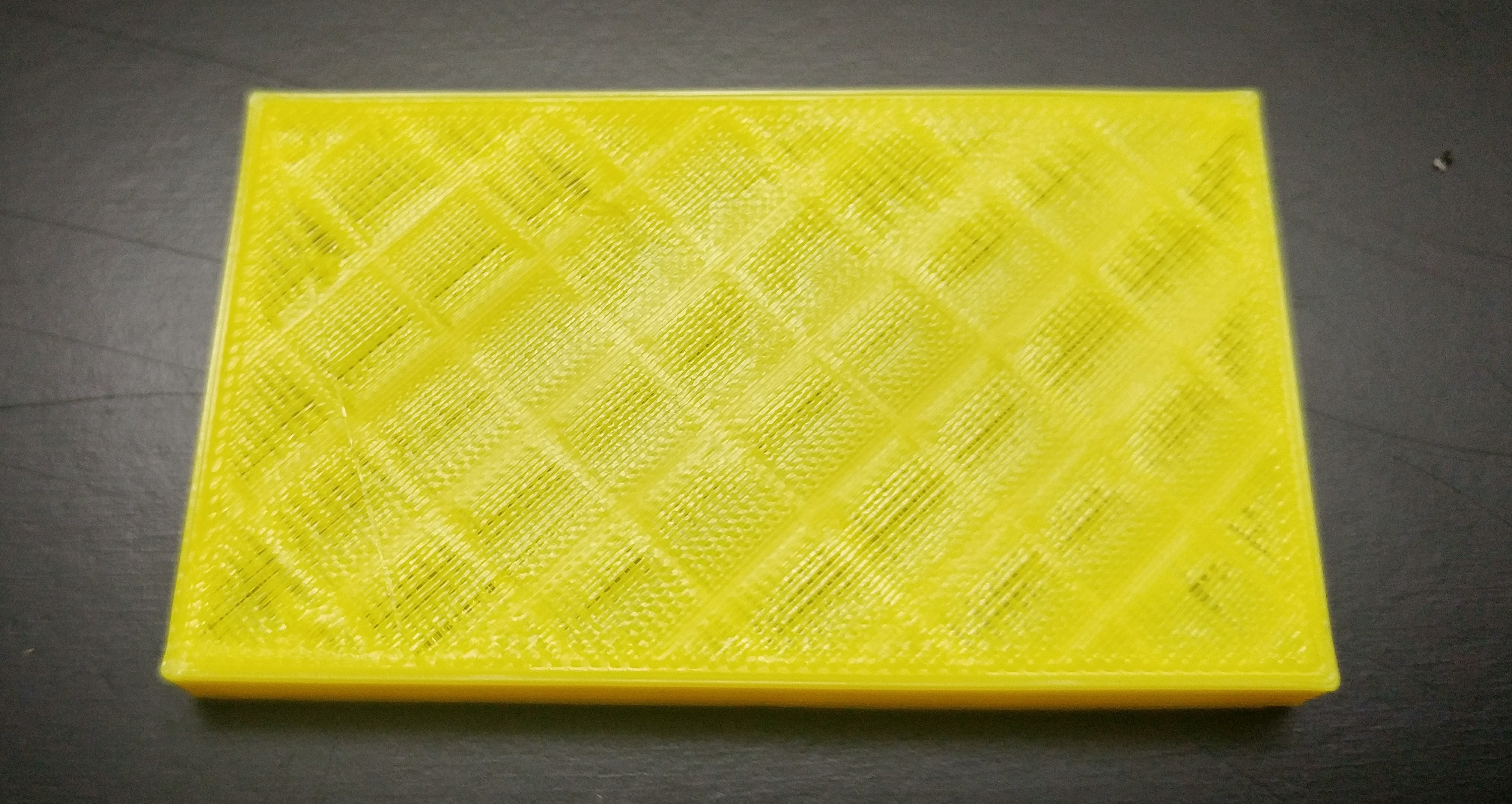
A pitted or pillowing top surface usually means the top layers are trying to bridge across gaps without enough support underneath.
### What pillowing looks like
Pillowing shows up as small dips, holes, or “pillows” in the very top layers, often with infill lines visible underneath.\
It is most common on large flat areas because each top line has to span a bigger distance between infill roads.
### Root causes
* Too little infill under the top surface, so the filament sags between infill lines.
* Not enough solid top layers, so the first few bridging lines never get fully covered.
* Weak bridging from the material and cooling setup, for example ABS or other filaments printed with minimal fan.
On a small part in PLA with good cooling, you might get away with 5% infill and 3 solid top layers, because the bridge distance is short and the fan cools the plastic quickly.\
On a larger flat ABS part with poor bridging you may need something like 25% infill and 5 solid top layers to get a closed, smooth roof.
### Adjusting infill and top layers
* Raise **infill density** until the top skin has enough support, typically 15 to 30% for normal parts, higher for very wide, flat roofs.
* Increase the number of top solid layers, or the top thickness, so later layers can iron out any gaps in the first bridging layer.
* Use a smaller layer height if you want the same total top thickness with more individual layers on top.
As a rough starting point: keep your total top thickness at least 4 to 6 times the layer height (for example 0.2 mm layers with 5 or 6 top layers).\
From there, increasing infill is usually the next most effective change for severe pillowing.
### Picking a better infill pattern
Infill pattern affects how well the top layers are supported.
* Grid or rectilinear gives straight ribs with clear gaps, which can make pillowing worse on big spans.
* Gyroid spreads support more evenly in both directions and has smoother transitions, so the top surface often bridges more consistently.
* Honeycomb and similar continuous patterns can also help by reducing long unsupported gaps beneath the top skin.
If you are chasing a smooth top on a large area, try switching from grid to gyroid and increasing infill density a bit at the same time.
### Material and cooling choices
Some filaments bridge far better than others.
* PLA typically bridges well with a strong part cooling fan and can tolerate lower infill on small roofs.
* ABS, ASA, and some nylons are printed with reduced or no fan to protect layer adhesion, which makes bridging and top surfaces more difficult.
* In those materials you often need higher infill, more top layers, and possibly slower top layer speeds to avoid sagging.
When you cannot use much fan, slowing down the top solid layers can give the filament more time to stick to the infill and to previous lines instead of drooping into gaps.\
A slightly lower extrusion temperature on top layers, within the recommended range, can also help bridge more cleanly in difficult materials.
### Updating settings in Bambu Studio
In Bambu Studio, you can adjust these values directly in the print profile.
* Open your project, pick the desired profile, then go to the **Strength** tab.
* Under shells, raise the “Top shell layers” value to add more solid top layers.
* Go to the **Infill** section to change “Infill density” and choose an infill pattern such as gyroid instead of grid.
After changing these, run a preview and inspect the top layers in layer view to confirm the roof looks fully closed and well supported.\
If you still see infill showing through in preview, keep increasing top layers or infill until the top skin looks continuous.
### Updating settings in other modern slicers
Most current slicers expose similar controls, just in slightly different menus.
* Look for **Top / Bottom** or **Shells** settings to increase the number of top layers or top thickness.
* Find the **Infill** panel to adjust density and pick patterns like gyroid or honeycomb.
* In cooling or material settings, tune fan speed and top layer speed to improve bridging while staying within the material’s recommendations.
A simple test is to print a flat calibration plate at your usual settings, then reprint with higher infill, more top layers, and a better infill pattern to see how much the top surface improves before you commit those values to production profiles.
---
# Agent Instructions
This documentation is published with GitBook. GitBook is the documentation platform designed so that both humans and AI agents can read, navigate, and reason over technical content effectively. Learn more at gitbook.com.
## Querying This Documentation
If you need additional information that is not directly available in this page, you can query the documentation by asking a question.
Perform an HTTP GET request on the following URL with the `ask` and `goal` query parameters:
```
GET https://wiki.polymaker.com/printing-tips/common-printing-issues/pillowed-pitted-top-of-print.md?ask=&goal=
```
`ask` is the immediate question: it should be specific, self-contained, and written in natural language.
`goal` is what the user is ultimately trying to achieve, the reason they need the answer. Sharing it helps GitBook give you a better, more relevant answer. A goal is most helpful when it describes the outcome the user wants rather than restating the question. For example, with `ask=how do I create an API token`, a goal like `automate deployments from our CI pipeline` lets GitBook tailor the answer to that use case.
The response will contain a direct answer to the question and relevant excerpts and sources from the documentation.
Use this mechanism when the answer is not explicitly present in the current page, you need clarification or additional context, or you want to retrieve related documentation sections.