> For the complete documentation index, see [llms.txt](https://wiki.polymaker.com/llms.txt). Markdown versions of documentation pages are available by appending `.md` to page URLs; this page is available as [Markdown](https://wiki.polymaker.com/printing-tips/common-printing-issues/dual-color-filament-swapping-flipping.md).
# Dual Color Filament Swapping/Flipping
Dual-color filaments create striking visual effects by blending two fixed colors along a single strand. These filaments are not randomized; instead, one color runs along one side of the strand, and the other color sits on the opposite side. The strand itself is slightly oval-shaped to help maintain its orientation as it feeds into the extruder. While simple in concept, achieving consistent color alignment requires careful control of your printer’s mechanics and settings.
Panchroma™ Dual - Matte Shadow Black flipping/swapping in the middle of a print
### 1. Maintain Proper Extruder Tension
One of the most common causes of color swapping is loose extruder tension. If the filament strand slips or rotates slightly as it passes through the drive gears, it can flip 180 degrees, causing the colors to reverse mid-print. Tightening the extruder tension just enough to grip the filament firmly without deforming it will greatly reduce this risk. It’s worth making small adjustments between prints until the filament feeds smoothly and consistently.
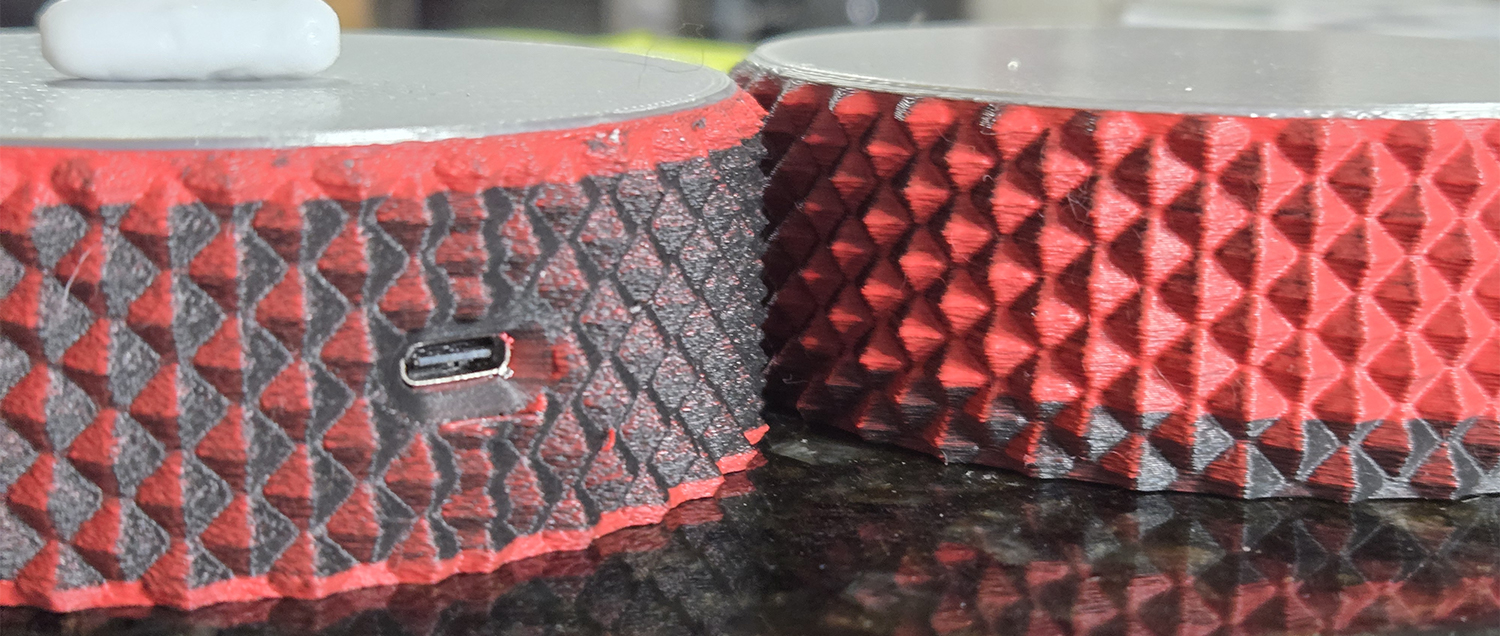
Panchroma™ Dual - Matte Shadow Red flipping/swapping in the middle of a print
### 2. Match Inner and Outer Wall Speeds
Keep your inner and outer wall speeds as close as possible. Large differences in print speeds between these walls can create fluctuations in extrusion pressure inside the nozzle. Those pressure changes may cause slight filament rotation, leading to unwanted color flips. As a general rule, keep the difference in wall speeds below 20%, or ideally identical for fine, surface-visible prints.
### 3. Minimize Speed Fluctuations
Consistency is key with dual-color material. Frequent or large shifts in print speed—such as between infill, walls, and top layers—can also cause inconsistent extrusion pressure. Aim to set most of your print speeds within a narrow range to maintain smooth, stable extrusion. This helps keep both the color alignment and the overall surface finish more uniform.
### 4. Minimize AMS Usage if Possible
Dual extrusion materials should be able to be used in an AMS like system - but the added length needed to reach the extruder along with any extra twists or turns to reach that exctruder can lead to swaps being more likely. Just be careful when using an AMS.
### 5. Fine-Tune Retraction and Flow
Small tuning changes can make a noticeable difference. Retraction that’s too aggressive can cause minor twisting of the filament inside the drive path, while insufficient flow may reduce filament pressure stability. Adjust these parameters gradually while observing prints with strong directional color lines.
### 6. Store and Handle Filament Carefully
Since dual-color strands rely on a fixed orientation, any kinking or twisting of the spool can introduce tension that leads to flipping during printing. Keep your filament neatly wound, store it with minimal crossovers, and unwind it gently before loading.
---
# Agent Instructions
This documentation is published with GitBook. GitBook is the documentation platform designed so that both humans and AI agents can read, navigate, and reason over technical content effectively. Learn more at gitbook.com.
## Querying This Documentation
If you need additional information that is not directly available in this page, you can query the documentation by asking a question.
Perform an HTTP GET request on the following URL with the `ask` and `goal` query parameters:
```
GET https://wiki.polymaker.com/printing-tips/common-printing-issues/dual-color-filament-swapping-flipping.md?ask=&goal=
```
`ask` is the immediate question: it should be specific, self-contained, and written in natural language.
`goal` is what the user is ultimately trying to achieve, the reason they need the answer. Sharing it helps GitBook give you a better, more relevant answer. A goal is most helpful when it describes the outcome the user wants rather than restating the question. For example, with `ask=how do I create an API token`, a goal like `automate deployments from our CI pipeline` lets GitBook tailor the answer to that use case.
The response will contain a direct answer to the question and relevant excerpts and sources from the documentation.
Use this mechanism when the answer is not explicitly present in the current page, you need clarification or additional context, or you want to retrieve related documentation sections.